
The 490-hour service
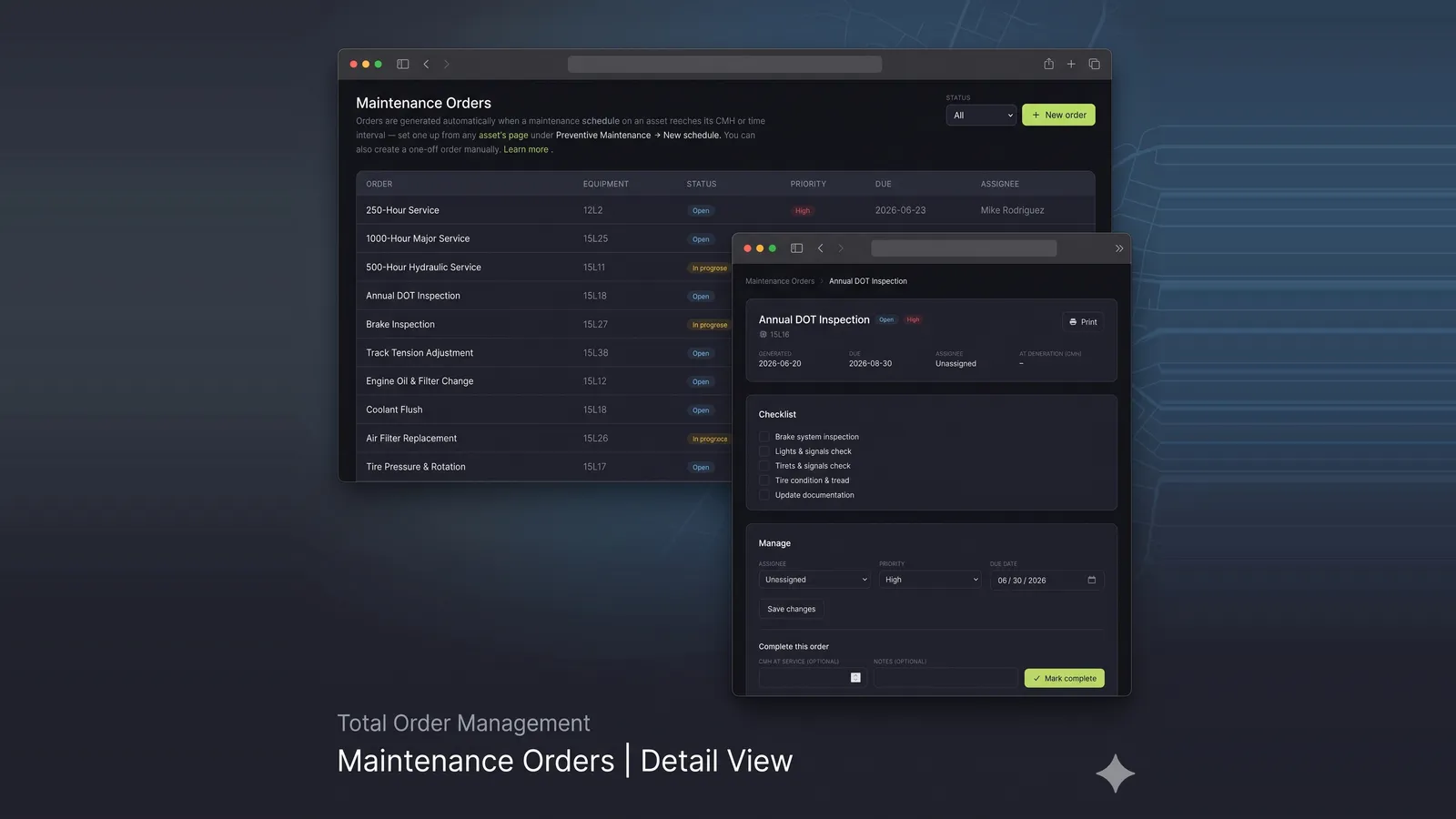
A while back we argued that the single biggest change to a maintenance program isn’t AI — it’s continuous machine hours, accrued from real telemetry. Suddenly you can schedule the 500-hour service at 490 hours instead of “when someone remembers to look.”
That was true. It was also half the story.
Knowing a machine sits at 490 hours doesn’t change the oil. Somewhere between the number on the dashboard and the wrench on the bolt, a job has to exist — assigned to a person, with a checklist, a due date, and a record that it happened. For most of our customers that job lived on a clipboard, a whiteboard, or in the service manager’s head. We’ve said our piece about the clipboard.
So we built the other half. It ships now, and it’s called Maintenance Orders.
A schedule is a rule. An order is a job.
Two ideas, kept deliberately separate.
A schedule is a recurring rule that lives on an asset: service every 250 CMH, inspect every 6 months, or both. Set both and an order fires whenever either comes due — whichever is first. A machine that runs hard gets serviced on hours; one that sits all winter still gets its annual. Every night, Fleet checks each schedule against the asset’s live CMH and elapsed time, and when one comes due with no open job already on it, it generates an order and emails the owners.
An order is the single job to do now. It carries a checklist — copied from the schedule, one task per line — plus an assignee, a priority, and a due date. You can also create one by hand for the ad-hoc work that was never on a schedule: the thing you noticed walking the yard.
The split matters because the rule and the job have different lifespans. The schedule is forever. The order is this week.
Working it
An order moves through four states — open, in progress, completed, cancelled — and most of the work happens in the middle. Tick checklist items off as you go. Reassign it. Bump the priority. When the work is done, you complete it: record the CMH at service and any notes, and two things happen on their own.
The schedule’s baseline resets, so the next order fires after the next full interval — no manual bookkeeping. And a permanent entry lands in the asset’s service history: what got done, when, at how many hours, by whom.
If an order passes its due date without being completed, the owners hear about it once more. Not a nag — just the one reminder you’d want.
Print it. Scan it. Done.
Here’s the part the shop floor actually feels.
Click Print on an order and you get a clean label: a QR code, the asset, the checklist. No app chrome, no screenshot of a dashboard. Tape it to the machine, the binder, wherever the tech will see it.
The tech scans that QR with the Echolo mobile app and the exact order opens on their phone — the right asset, already loaded. No account, no login, no scrolling a list for “Generator 09.” They read the hours off the machine, enter them, mark it complete. The reading comes off the hour meter in front of them, not off someone’s memory of it back at the desk. That’s the whole point of measuring hours instead of guessing them — it shouldn’t fall apart at the last step.
What it doesn’t do
In keeping with house tradition, the honest list of what we left out:
- No parts inventory. An order tells you what to do, not what’s on the shelf. If you need stock levels, that’s a different system, and we’d rather link to it than fake it.
- No labor billing. We record that the service happened and at what hours. We don’t price it.
- No predicting the failure. Same as ever — the schedule fires on hours and time, both of which we can measure exactly. We’re not guessing when the bearing goes.
What’s left is small, and it’s the part that moves the needle: the number becomes a job, the job gets done, and the doing gets written down. Maintenance Orders is on the Enterprise plan.
That’s the 490-hour service. Booked, assigned, and on the record — at 490, not whenever someone notices.
Want to see it on your fleet? Talk to us.