
Building Fleet for the field
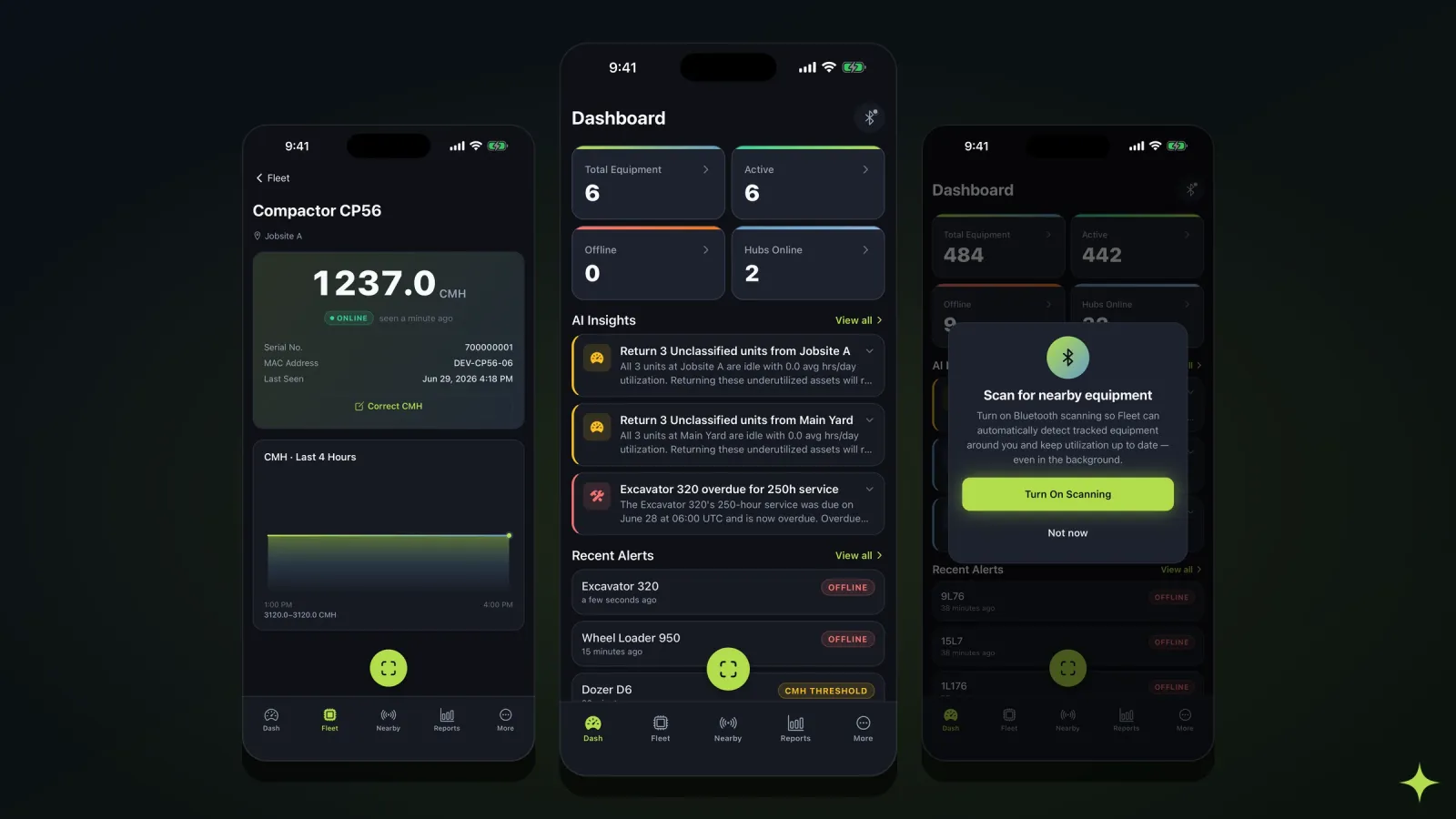
We wrote a while back about a day in Fleet — an ops lead with the dashboard open in a browser tab and a coffee in their hand. That person is at a desk. Most of the people who actually touch a fleet are not.
The technician doing the 490-hour service is under the machine. The yard hand checking gear in is standing in gravel with one hand on a scanner and one eye on the weather. Neither of them has the browser version open, and cramming the browser version onto a 6-inch screen wouldn’t help them if they did. So we built the other half: Fleet Mobile. It’s on the App Store now — iPhone and iPad — and here’s what building it taught us.
The field is not the office
A desktop dashboard assumes a lot of things a job site doesn’t provide: a big screen, two free hands, steady light, a steady network, and someone whose whole job right now is looking at it. The field provides none of those.
So the app isn’t a re-skinned dashboard. It’s dark and high-contrast because a bright white screen is unreadable at noon in a gravel yard. Touch targets are big because the user is wearing gloves. There’s one primary action per screen because the user is doing three other things. We already knew most of this from installing hardware in these environments — the constraints of off-highway work don’t stop at the enclosure.
Offline-first is the premise, not a feature
The single most important thing the app does is keep working when the network doesn’t.
Every asset carries a QR code. Scan it to check the machine in, log its current hours, and drop a note. Scan a maintenance code to close a service order against the CMH the machine is actually reading. That’s the loop the field cares about, and it has to survive the fact that the places this app is most useful are the places with the worst signal.
So when you submit from a dead zone, nothing goes out and nothing is lost. The submission queues on the device, a banner shows you what’s waiting, and it syncs the instant the signal comes back — no retry, no re-typing, no “are you sure it saved.” The person standing at the machine gets to move on and trust that the record caught up.
Every phone is a hub
The capability we’re most excited about: your phone scans for your Bluetooth-tagged equipment, reports what it hears back to the platform, and becomes a roaming hub. Switch on background scanning and it keeps checking in without you opening anything — though not continuously. The OS wakes the app every so often rather than letting it listen non-stop, which is the trade you make for a phone that still has battery at the end of a shift. A periodic check-in is plenty when the question is “was it still here this afternoon.”
A fixed hub covers the yard it’s bolted to. A crew’s phones cover everywhere the crew goes: the remote pour, the rental drop, the corner of a site you were never going to trench power out to. Every phone in a pocket extends your coverage for free — and the gaps between fixed hubs are exactly where equipment goes missing.
Two honest caveats, because this is the part the industry loves to oversell:
- It complements fixed hubs, it doesn’t replace them. Phones come and go, batteries die, people drive home at five. The bolted-down hubs are the always-on backbone; the phones fill the gaps between them. We’ve argued before that the hub is the important part — that’s still true.
- It tracks equipment, not people. The background scan is listening for your tagged gear, not your crew. A sighting belongs to the machine, not the person whose phone happened to hear it.
Presence, not a moving dot
There’s one thing background scanning still isn’t: a live map of where everything is. The app shows presence — what a phone or a hub can hear right now — and last seen, the last place a reader heard a tag. Neither is a dot sliding across a map, and we don’t draw one, on purpose. Real-time position on this kind of gear would mean a GPS and a cellular modem bolted to every asset — a different, far more expensive product for a different problem. What a fleet actually needs is “which site is it at” and “when did it last check in,” and presence answers that honestly.
The hours come with you
CMH is the number Fleet is built around, and the app puts it in your hand: live per-asset readings, a trend chart, and threshold alerts that arrive as a push and clear with a swipe.
The reason the scan-to-log flow matters is timing. The hours get captured at the machine, by the person who’s standing there, at the moment they’re standing there — not reconstructed from a clipboard at the end of a long shift. That gap between the meter and the memory is exactly where the numbers go wrong, which we wrote about separately.
What we kept on the web, on purpose
The same restraint we used on the web app applies here — some things don’t belong in a glove’s reach on a job site:
- Billing, roles, and account admin stay on the web. The phone is for field work, not for running the org.
- It’s one platform, not two products. The app reads and writes the same source of truth as the portal — the same device registry, the same hours, the same alerts. The field and the office never disagree, because there’s nothing to reconcile.
- Android is coming. iPhone and iPad shipped first because we’d rather do one platform well than two badly. It’s a “not yet,” not a “never.”
The test for the mobile app was the same one we used for the browser: can someone keep it in a pocket for a whole shift and trust what it tells them, without babysitting it. Everything went through that filter — the background scan that earns its keep, and the live map we decided a phone shouldn’t pretend to have.
Fleet Mobile is the field half of the Echolo Fleet platform. If you want to see it running on your own fleet’s data, get in touch.